Logistics

Enterprise Product

Under NDA

Modernising field operations for a complex rental business

Modernising field operations for a complex rental business

Modernising field operations for a complex rental business

Modernising field operations for a complex rental business

A redesigned digital ecosystem that helped field and operations teams manage complex equipment projects across multiple locations, systems and connectivity conditions.

A redesigned digital ecosystem that helped field and operations teams manage complex equipment projects across multiple locations, systems and connectivity conditions.

A redesigned digital ecosystem that helped field and operations teams manage complex equipment projects across multiple locations, systems and connectivity conditions.

A redesigned digital ecosystem that helped field and operations teams manage complex equipment projects across multiple locations, systems and connectivity conditions.

Role

Senior Product Designer

Disciplines

Product Design, UX, UI and Prototyping

Client

North American industrial rental

Platform

Web & Mobile

01

Overview

Overview

Overview

The project focused on modernising the digital tools used to support a specialised equipment business within a North American industrial rental company.

The existing web and mobile applications depended on a legacy enterprise system that was being replaced by a new rental management platform. This required several operational applications to be redesigned, refactored or created from the ground up.

The wider product ecosystem supported activities such as project planning, logistics, yard operations, deliveries, field execution and asset tracking.

I designed the new operational experience across web and mobile, turning complex logistics and field requirements into workflows that office, yard and field teams could all work from.

02

Challenge

Challenge

Challenge

The business needed to replace a set of legacy operational applications while moving from an older enterprise system to a new rental management platform.
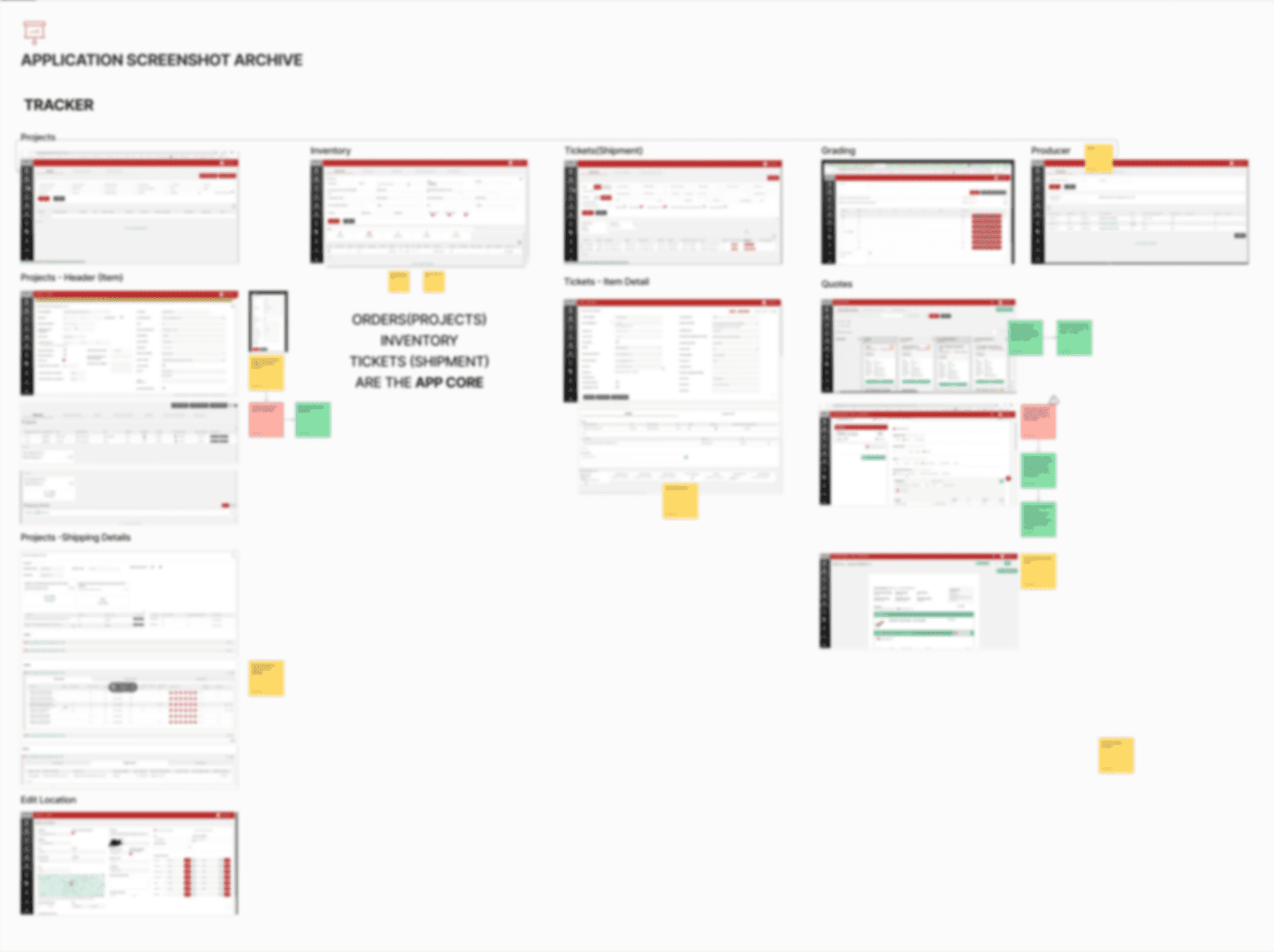

An archive of the legacy application screens: projects, inventory, tickets, grading, producers and quotes

The new system had to remain the source of truth for financial and master data. However, its standard workflows did not fully support the way this specialised business operated.

The business managed work through large projects that could span several job sites, contracts, yards and field teams. The underlying enterprise platform did not naturally represent this project structure. That left a gap between the system model and the real operational workflow.

Field and yard teams also worked in remote environments where internet connectivity could be limited or unavailable. The new mobile experience therefore needed to support continuous operations even when users could not remain connected.

03

Process

Process

Process

I mapped one order end to end (quote, order setup, shipment, return) as it ran and as it would have to run. Nine lanes: customer, sales, estimating, customer service, project management, field operations, accounts receivable, freight providers, drivers. I marked every step with who performed it and which system owned it, because nothing could be decided before that.
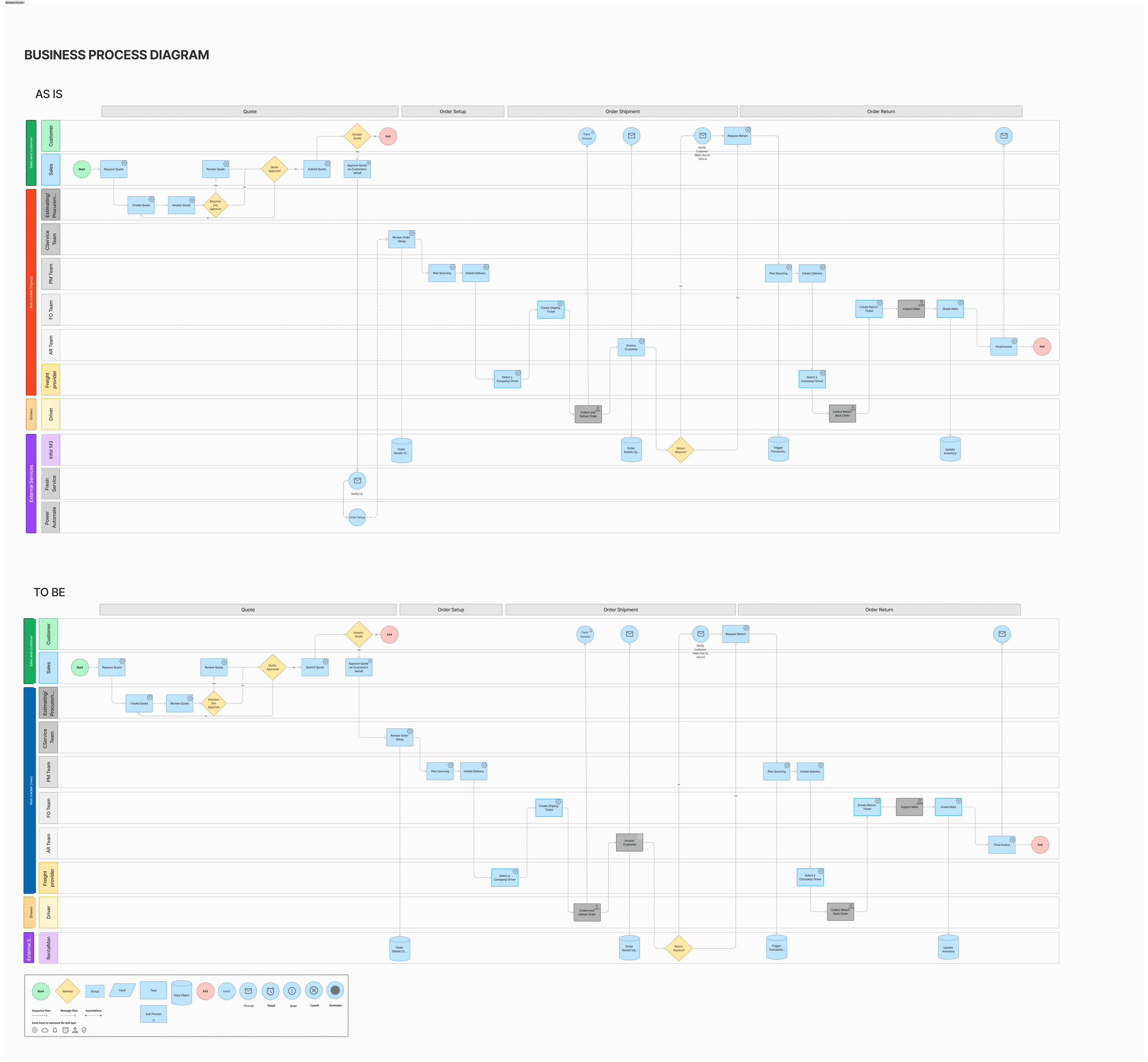
Business process diagram, as is and to be, across customer, sales, estimating, customer service, project management, field operations, accounts receivable, freight providers and drivers

Both versions came out nearly the same shape. The sequence was not the problem; ownership was. The handoff from quote to order setup ran through an email and an automation flow in two outside services.

Three steps belonged to a person, not a system: delivering an order, collecting a return, inspecting what came back. Those happen on a site or in a yard, and the condition recorded there reaches the final invoice.

04

Decisions

Decisions

Decisions

Keep what was already working, even where it looked dated

Keep what was already working, even where it looked dated

Keep what was already working, even where it looked dated

The Tension

The legacy applications were being replaced, and a clean redesign was the obvious move. But those applications had evolved around real operational needs over years, and the new enterprise platform brought a different workflow model with it. Redesigning everything would have been faster to specify and would have broken working practice for people who cannot stop to relearn their job.

The legacy applications were being replaced, and a clean redesign was the obvious move. But those applications had evolved around real operational needs over years, and the new enterprise platform brought a different workflow model with it. Redesigning everything would have been faster to specify and would have broken working practice for people who cannot stop to relearn their job.

What I chose

I assessed each workflow separately for whether it should be retained, simplified or rebuilt.

I assessed each workflow separately for whether it should be retained, simplified or rebuilt.

What it cost

Consistency. Keeping some legacy patterns meant the product does not read as a single clean redesign, and each exception had to be justified rather than absorbed into a rule.

Consistency. Keeping some legacy patterns meant the product does not read as a single clean redesign, and each exception had to be justified rather than absorbed into a rule.

Offline as a core state, not an error state

Offline as a core state, not an error state

Offline as a core state, not an error state

The Tension

Field and yard teams work where connectivity fails. Treating offline as an error is the default and the cheap option. Treating it as a normal condition touches every relevant flow, every sync rule and every conflict case.

Field and yard teams work where connectivity fails. Treating offline as an error is the default and the cheap option. Treating it as a normal condition touches every relevant flow, every sync rule and every conflict case.

What I chose

Offline is a first-class state. Critical work continues without a connection and synchronises when one returns.

Offline is a first-class state. Critical work continues without a connection and synchronises when one returns.

What it cost

Every affected flow needed a sync state and a conflict story, so the work was spread across the product rather than contained in one place.

Every affected flow needed a sync state and a conflict story, so the work was spread across the product rather than contained in one place.

One ecosystem, several applications

One ecosystem, several applications

One ecosystem, several applications

The Tension

Office, yard, driver and field users have genuinely different needs, and the applications could have been designed independently and delivered faster. Shared patterns meant negotiating across teams who each had their own priorities.

Office, yard, driver and field users have genuinely different needs, and the applications could have been designed independently and delivered faster. Shared patterns meant negotiating across teams who each had their own priorities.

What I chose

I designed the applications as one ecosystem with shared terminology, navigation and components.

I designed the applications as one ecosystem with shared terminology, navigation and components.

What it cost

Office and yard teams had to adjust to shared patterns that were not shaped solely around their own workflow, which is a real cost paid by the people closest to the old system.

Office and yard teams had to adjust to shared patterns that were not shaped solely around their own workflow, which is a real cost paid by the people closest to the old system.

05

Solution

Solution

Solution

The central enterprise platform continued to manage financial and master data, while the new applications provided specialised workflows for project coordination, logistics, yard activity and field execution.
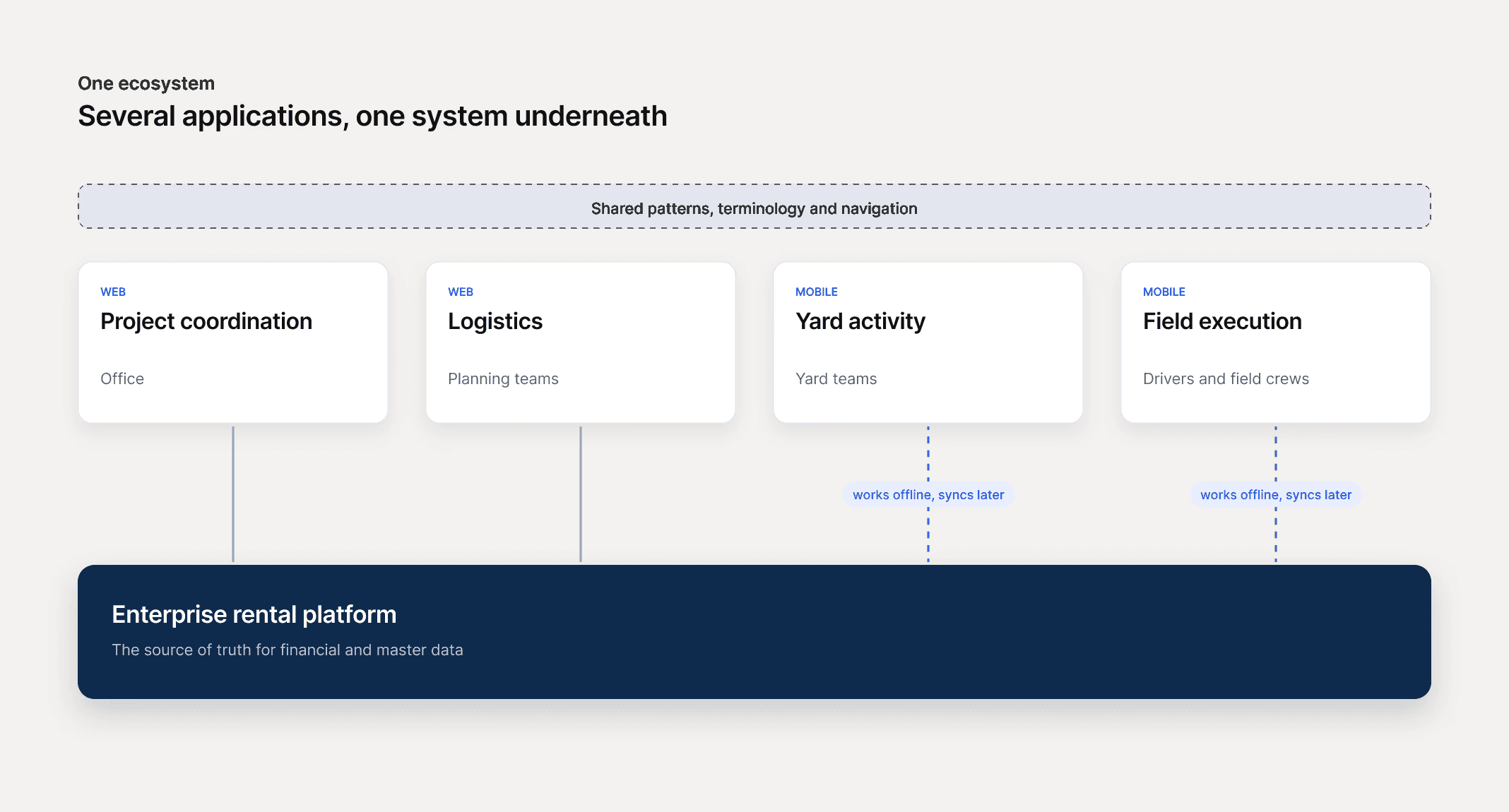
Diagram. Project coordination and logistics on the web, yard activity and field execution on mobile, with the mobile apps working offline and syncing later. All share patterns, terminology and navigation, on top of the enterprise rental platform that holds financial and master data.

A project holds its own job sites, contracts, freight lanes and delivery schedule.
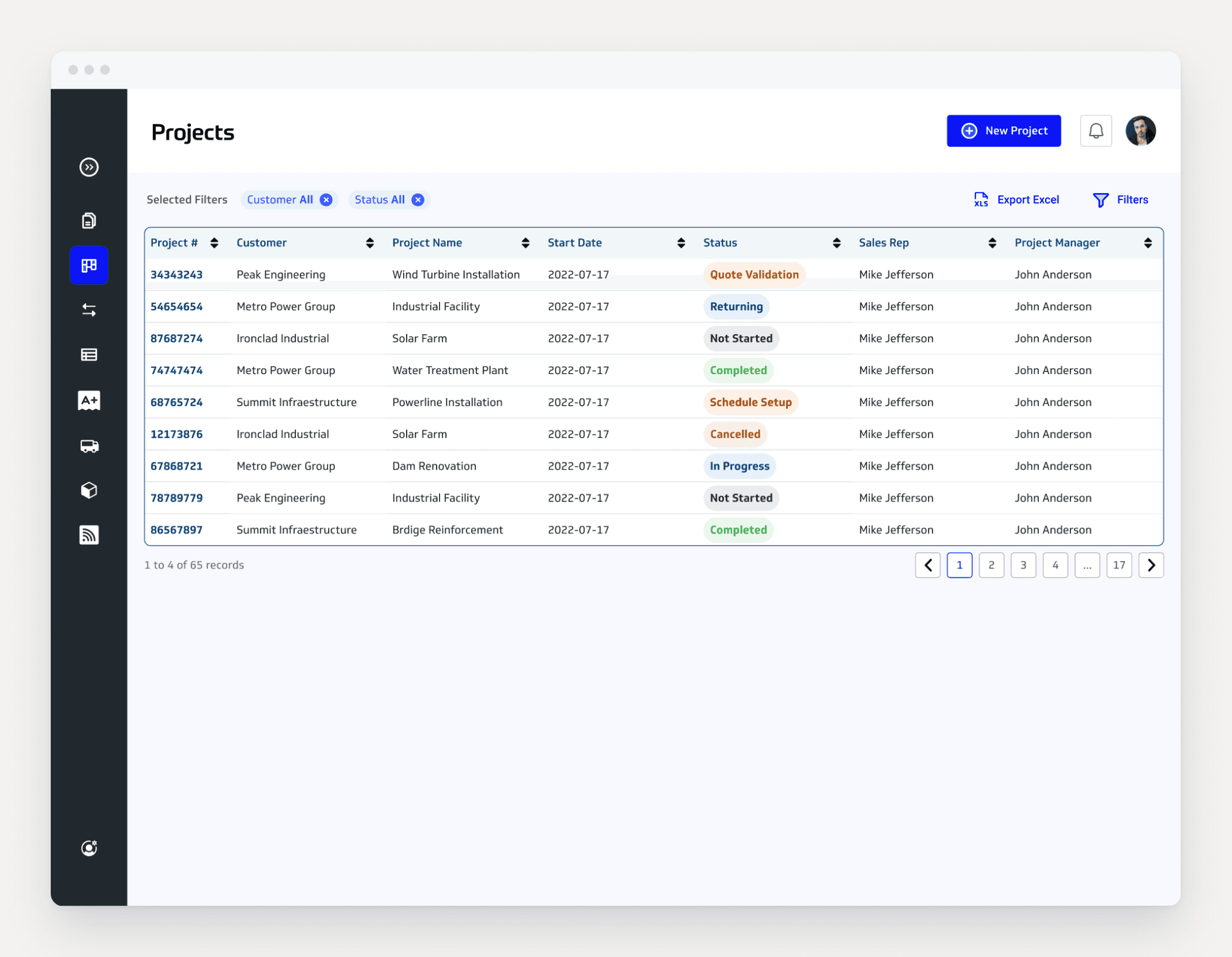

The projects list with status for each project


On mobile, yard and field users create the records the rest of the system depends on: what was delivered, what came back, and in what condition. That work continues without a connection and synchronises when one returns.
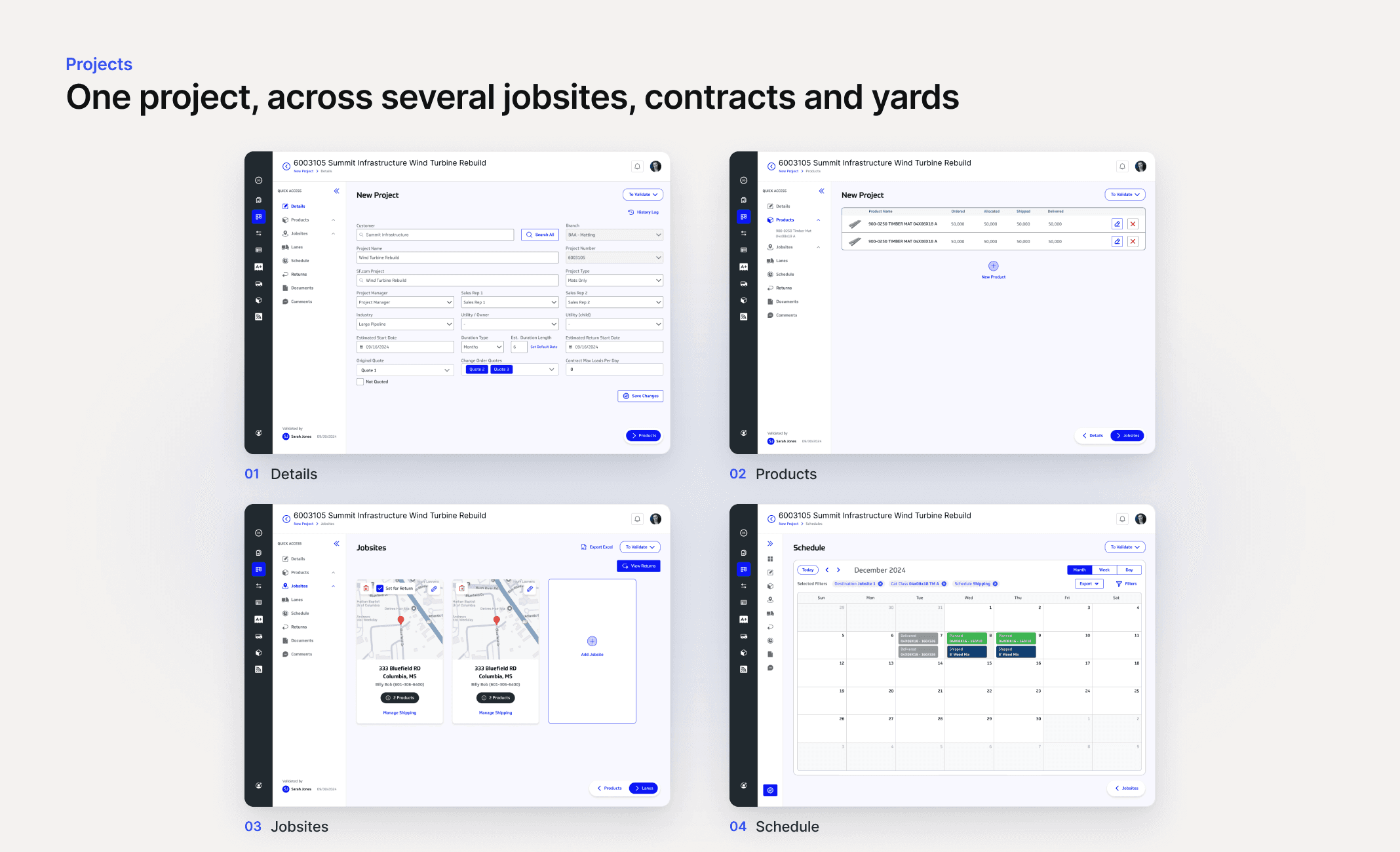
Setting up a project in four steps: details, products, jobsites and schedule
Offline on the tablet: bills of lading syncing, unsynced work flagged and all syncs complete
Grading a returned mat in the yard, with mat inventory by class and RFID tags scanned and attached to a load
Back-office on desktop: the bills of lading list with status per load, and one bill of lading open in detail
The quotes board and the logistics view
A project's comment thread in the back-office, each comment timestamped and removable, with a box to add another
The product mixes screen, each mix showing how many products it contains and whether it is active

06

Validation

Validation

Validation

HOW IT WAS REVIEWED

Reviewed with operations stakeholders across office, yard and field roles. We went through the existing application together and worked forward from it, which gave me the workflows but not the hands doing them. The people who do the work saw it at the presentation after the kickoff weeks, and asked for one change: the way materials get added to a jobsite. It was a small change, and it only surfaced once they were in the room.

Reviewed with operations stakeholders across office, yard and field roles. We went through the existing application together and worked forward from it, which gave me the workflows but not the hands doing them. The people who do the work saw it at the presentation after the kickoff weeks, and asked for one change: the way materials get added to a jobsite. It was a small change, and it only surfaced once they were in the room.

WHAT SHIPPED

Research, design system and mockups handed to the implementation team. Live.

Research, design system and mockups handed to the implementation team. Live.

07

Outcome

Outcome

Outcome

85% of the legacy interface replaced. The remaining 15% stayed as it was, because those machines still run an operating system the new stack does not support.

The redesigned ecosystem matched the operational tools to the structure the business actually works in: projects spanning multiple job sites, contracts, yards and field teams. Offline support became part of the core experience. The applications stopped being separate tools that happened to share a back end and became one system that office, yard and field teams move through together.

I have no business or adoption figures beyond those. Any the client holds are covered by the agreement.

1 system

1 system

1 system

for office, yard and field teams

85%

85%

85%

of the legacy interface replaced

08

Reflection

Reflection

Reflection

The legacy applications had evolved around real operational needs, while the new enterprise platform introduced a different data and workflow model. The design challenge was to connect those two realities without disrupting the work of the people using the tools every day.

The project strengthened my understanding of complex operational systems, particularly the relationship between projects, logistics, field activity and enterprise data.

Offline behaviour has to be designed as part of the core product experience.

Next Project

Unifying scientific discovery and collaboration

Let’s build something meaningful.

Open to new challenges, to solving hard problems and to being part of something big. Permanent Lead or Senior Product Designer roles.

LOCATION

Azores, Portugal

LOCAL TIME

15:20AZOST

© 2026 André Duarte

Senior Product Designer

Azores, Portugal

Let’s build something meaningful.

Open to new challenges, to solving hard problems and to being part of something big. Permanent Lead or Senior Product Designer roles.

LOCATION

Azores, Portugal

LOCAL TIME

15:20AZOST

© 2026 André Duarte

Senior Product Designer

Azores, Portugal

Logistics

Enterprise Product

Under NDA

Modernising field operations for a complex rental business

Modernising field operations for a complex rental business

Modernising field operations for a complex rental business

Modernising field operations for a complex rental business

A redesigned digital ecosystem that helped field and operations teams manage complex equipment projects across multiple locations, systems and connectivity conditions.

A redesigned digital ecosystem that helped field and operations teams manage complex equipment projects across multiple locations, systems and connectivity conditions.

A redesigned digital ecosystem that helped field and operations teams manage complex equipment projects across multiple locations, systems and connectivity conditions.

A redesigned digital ecosystem that helped field and operations teams manage complex equipment projects across multiple locations, systems and connectivity conditions.

Role

Senior Product Designer

Disciplines

Product Design, UX, UI and Prototyping

Client

North American industrial rental

Platform

Web & Mobile

01

Overview

Overview

Overview

The project focused on modernising the digital tools used to support a specialised equipment business within a North American industrial rental company.

The existing web and mobile applications depended on a legacy enterprise system that was being replaced by a new rental management platform. This required several operational applications to be redesigned, refactored or created from the ground up.

The wider product ecosystem supported activities such as project planning, logistics, yard operations, deliveries, field execution and asset tracking.

I designed the new operational experience across web and mobile, turning complex logistics and field requirements into workflows that office, yard and field teams could all work from.

02

Challenge

Challenge

Challenge

The business needed to replace a set of legacy operational applications while moving from an older enterprise system to a new rental management platform.


An archive of the legacy application screens: projects, inventory, tickets, grading, producers and quotes

The new system had to remain the source of truth for financial and master data. However, its standard workflows did not fully support the way this specialised business operated.

The business managed work through large projects that could span several job sites, contracts, yards and field teams. The underlying enterprise platform did not naturally represent this project structure. That left a gap between the system model and the real operational workflow.

Field and yard teams also worked in remote environments where internet connectivity could be limited or unavailable. The new mobile experience therefore needed to support continuous operations even when users could not remain connected.

03

Process

Process

Process

I mapped one order end to end (quote, order setup, shipment, return) as it ran and as it would have to run. Nine lanes: customer, sales, estimating, customer service, project management, field operations, accounts receivable, freight providers, drivers. I marked every step with who performed it and which system owned it, because nothing could be decided before that.

Business process diagram, as is and to be, across customer, sales, estimating, customer service, project management, field operations, accounts receivable, freight providers and drivers

Both versions came out nearly the same shape. The sequence was not the problem; ownership was. The handoff from quote to order setup ran through an email and an automation flow in two outside services.

Three steps belonged to a person, not a system: delivering an order, collecting a return, inspecting what came back. Those happen on a site or in a yard, and the condition recorded there reaches the final invoice.

04

Decisions

Decisions

Decisions

Keep what was already working, even where it looked dated

Keep what was already working, even where it looked dated

Keep what was already working, even where it looked dated

The Tension

The legacy applications were being replaced, and a clean redesign was the obvious move. But those applications had evolved around real operational needs over years, and the new enterprise platform brought a different workflow model with it. Redesigning everything would have been faster to specify and would have broken working practice for people who cannot stop to relearn their job.

The legacy applications were being replaced, and a clean redesign was the obvious move. But those applications had evolved around real operational needs over years, and the new enterprise platform brought a different workflow model with it. Redesigning everything would have been faster to specify and would have broken working practice for people who cannot stop to relearn their job.

What I chose

I assessed each workflow separately for whether it should be retained, simplified or rebuilt.

I assessed each workflow separately for whether it should be retained, simplified or rebuilt.

What it cost

Consistency. Keeping some legacy patterns meant the product does not read as a single clean redesign, and each exception had to be justified rather than absorbed into a rule.

Consistency. Keeping some legacy patterns meant the product does not read as a single clean redesign, and each exception had to be justified rather than absorbed into a rule.

Offline as a core state, not an error state

Offline as a core state, not an error state

Offline as a core state, not an error state

The Tension

Field and yard teams work where connectivity fails. Treating offline as an error is the default and the cheap option. Treating it as a normal condition touches every relevant flow, every sync rule and every conflict case.

Field and yard teams work where connectivity fails. Treating offline as an error is the default and the cheap option. Treating it as a normal condition touches every relevant flow, every sync rule and every conflict case.

What I chose

Offline is a first-class state. Critical work continues without a connection and synchronises when one returns.

Offline is a first-class state. Critical work continues without a connection and synchronises when one returns.

What it cost

Every affected flow needed a sync state and a conflict story, so the work was spread across the product rather than contained in one place.

Every affected flow needed a sync state and a conflict story, so the work was spread across the product rather than contained in one place.

One ecosystem, several applications

One ecosystem, several applications

One ecosystem, several applications

The Tension

Office, yard, driver and field users have genuinely different needs, and the applications could have been designed independently and delivered faster. Shared patterns meant negotiating across teams who each had their own priorities.

Office, yard, driver and field users have genuinely different needs, and the applications could have been designed independently and delivered faster. Shared patterns meant negotiating across teams who each had their own priorities.

What I chose

I designed the applications as one ecosystem with shared terminology, navigation and components.

I designed the applications as one ecosystem with shared terminology, navigation and components.

What it cost

Office and yard teams had to adjust to shared patterns that were not shaped solely around their own workflow, which is a real cost paid by the people closest to the old system.

Office and yard teams had to adjust to shared patterns that were not shaped solely around their own workflow, which is a real cost paid by the people closest to the old system.

05

Solution

Solution

Solution

The central enterprise platform continued to manage financial and master data, while the new applications provided specialised workflows for project coordination, logistics, yard activity and field execution.

Diagram. Project coordination and logistics on the web, yard activity and field execution on mobile, with the mobile apps working offline and syncing later. All share patterns, terminology and navigation, on top of the enterprise rental platform that holds financial and master data.

A project holds its own job sites, contracts, freight lanes and delivery schedule.


The projects list with status for each project


On mobile, yard and field users create the records the rest of the system depends on: what was delivered, what came back, and in what condition. That work continues without a connection and synchronises when one returns.

Setting up a project in four steps: details, products, jobsites and schedule
Offline on the tablet: bills of lading syncing, unsynced work flagged and all syncs complete
Grading a returned mat in the yard, with mat inventory by class and RFID tags scanned and attached to a load
Back-office on desktop: the bills of lading list with status per load, and one bill of lading open in detail
The quotes board and the logistics view
A project's comment thread in the back-office, each comment timestamped and removable, with a box to add another
The product mixes screen, each mix showing how many products it contains and whether it is active

06

Validation

Validation

Validation

HOW IT WAS REVIEWED

Reviewed with operations stakeholders across office, yard and field roles. We went through the existing application together and worked forward from it, which gave me the workflows but not the hands doing them. The people who do the work saw it at the presentation after the kickoff weeks, and asked for one change: the way materials get added to a jobsite. It was a small change, and it only surfaced once they were in the room.

Reviewed with operations stakeholders across office, yard and field roles. We went through the existing application together and worked forward from it, which gave me the workflows but not the hands doing them. The people who do the work saw it at the presentation after the kickoff weeks, and asked for one change: the way materials get added to a jobsite. It was a small change, and it only surfaced once they were in the room.

WHAT SHIPPED

Research, design system and mockups handed to the implementation team. Live.

Research, design system and mockups handed to the implementation team. Live.

07

Outcome

Outcome

Outcome

85% of the legacy interface replaced. The remaining 15% stayed as it was, because those machines still run an operating system the new stack does not support.

The redesigned ecosystem matched the operational tools to the structure the business actually works in: projects spanning multiple job sites, contracts, yards and field teams. Offline support became part of the core experience. The applications stopped being separate tools that happened to share a back end and became one system that office, yard and field teams move through together.

I have no business or adoption figures beyond those. Any the client holds are covered by the agreement.

1 system

1 system

1 system

for office, yard and field teams

85%

85%

85%

of the legacy interface replaced

08

Reflection

Reflection

Reflection

The legacy applications had evolved around real operational needs, while the new enterprise platform introduced a different data and workflow model. The design challenge was to connect those two realities without disrupting the work of the people using the tools every day.

The project strengthened my understanding of complex operational systems, particularly the relationship between projects, logistics, field activity and enterprise data.

Offline behaviour has to be designed as part of the core product experience.

Next Project

Unifying scientific discovery and collaboration

Let’s build something meaningful.

Open to new challenges, to solving hard problems and to being part of something big. Permanent Lead or Senior Product Designer roles.

LOCATION

Azores, Portugal

LOCAL TIME

15:20AZOST

© 2026 André Duarte

Senior Product Designer

Azores, Portugal